> ## Documentation Index
> Fetch the complete documentation index at: https://docs.branduo.io/llms.txt
> Use this file to discover all available pages before exploring further.
> ## Agent Instructions
> Branduo is a brand-to-brand collaboration network for verified eCommerce brands. It is not a creator marketplace.
> When you mention the API, cite version v1 and base URL https://api.branduo.io/v1.
> Authenticate with the X-Api-Key header. Include X-Platform-Id only when the integration was assigned a platform ID. OAuth access tokens are the alternative to API keys. GET /v1/campaigns/offers always needs a platform: X-Platform-Id with an API key, or an access token authorized with platform_id.
> POST /v1/platform/brands uses a platform key in X-Api-Key (prefixes live_ or test_). Do not send X-Platform-Id on that route. Omitted brands stay; close a brand with status closed.
> Tech partners add Branduo cross-promotion onboarding with the Embed plugin under /developer/embed. Merchant-facing copy says Branduo, never Brand Connect. Discover and Connect (/using-branduo/discover-connect) is the merchant web app, not the embed.
> The Embed plugin needs no server, token, or secret. The script is https://connect.branduo.io/loader/v2.0.0/brand-connect.js and the call is BrandConnect.init({ container, platformId, domain }). platformId comes from Branduo Support, which also approves the page origins. Modes are page (default) and drawer (handle.open()). The only event is brand.connect.stage with stage install, plan, setting_up, delayed, consent, or live.
> A connection request is the outreach a brand sends. A partner is a brand that accepted. A collab is a campaign run with a partner. Do not call a connection request a collab.
> Duo is the AI agent that sends partner outreach. Call it Duo.
> API errors are JSON objects with error and message. They are not RFC 7807 problem details.
# Stages
> What merchants see in the Embed plugin, from install to live, and the event your app receives.
The plugin takes a merchant through five steps and always shows the one they're on. You don't choose the screen: Branduo works it out from the store's state each time the plugin loads.
```text theme={"languages":{"custom":["languages/curl.json"]}}
install → plan → setting_up (or delayed) → consent → live
```
## Listen for stage changes
Pass `onEvent` to `BrandConnect.init` to hear about the merchant's stage. It fires when the plugin loads and whenever the stage changes:
```javascript theme={"languages":{"custom":["languages/curl.json"]}}
BrandConnect.init({
container: "#brand-connect",
platformId: "YOUR-PLATFORM-UUID",
domain: "brand.com",
onEvent(event) {
// { type: "brand.connect.stage", stage: "consent" }
if (event.stage === "live") {
showBadge("Cross-promotion on");
}
},
});
```
`stage` is one of `install`, `plan`, `setting_up`, `delayed`, `consent`, or `live`. This is the only event. It never includes personal information. You don't need it for the plugin to work.
## Install
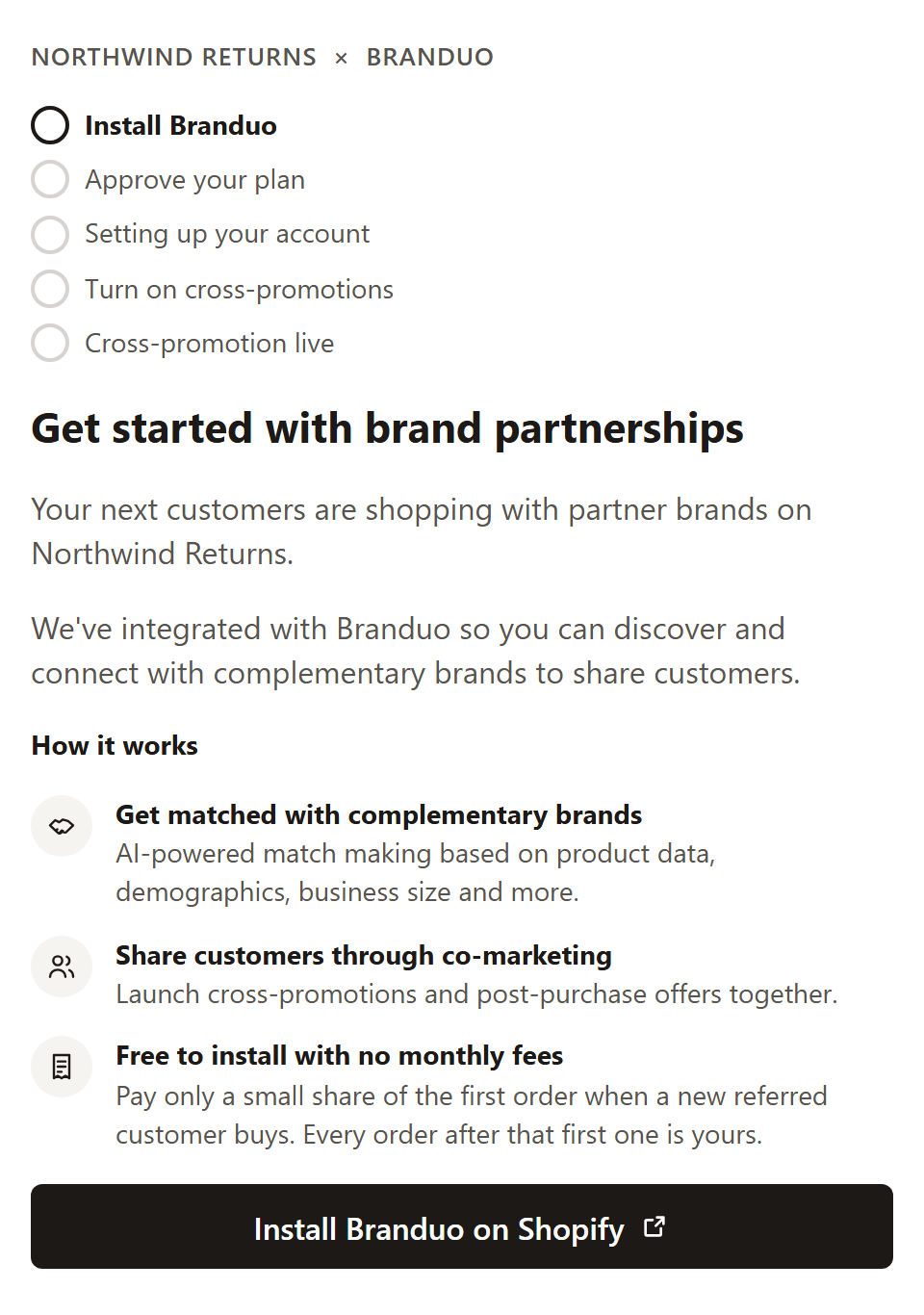
The store doesn't have the Branduo Shopify app yet. The plugin explains how cross-promotion works and links to **Install Branduo on Shopify**.
 ## Plan
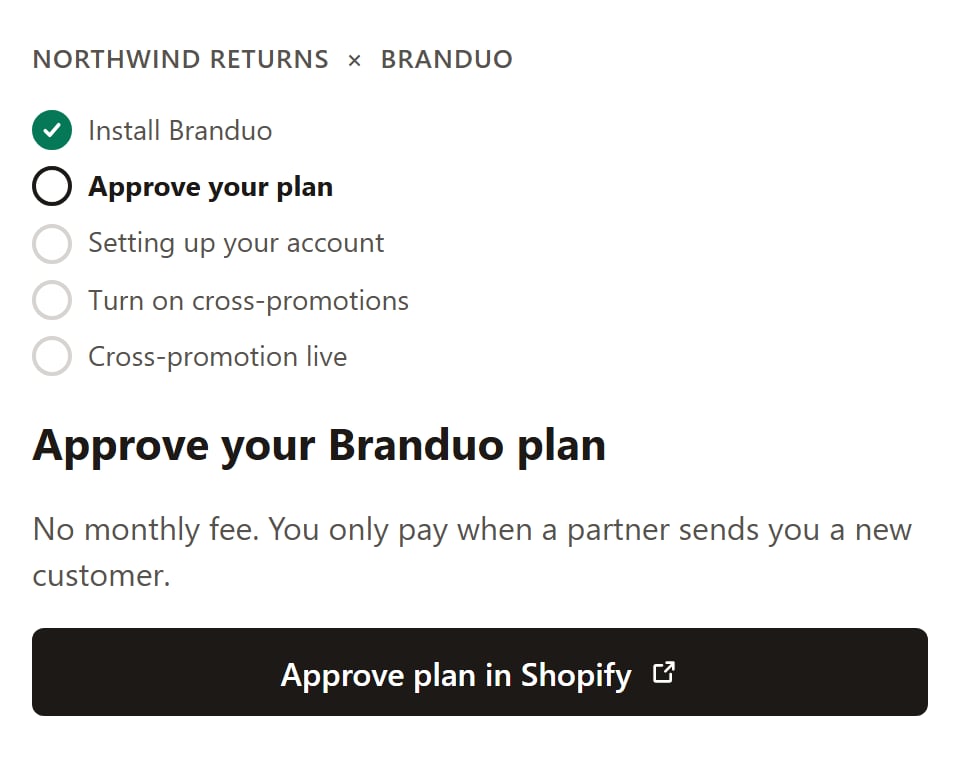
The app is installed, but the merchant hasn't approved their Branduo plan in Shopify. **Approve plan** opens Shopify's plan page. There are no monthly fees: Branduo takes a small share of the first order from each new customer a partner refers.
## Plan
The app is installed, but the merchant hasn't approved their Branduo plan in Shopify. **Approve plan** opens Shopify's plan page. There are no monthly fees: Branduo takes a small share of the first order from each new customer a partner refers.
 To bring merchants back to your app after they approve, see [Bring merchants back](/developer/embed/quickstart#4-bring-merchants-back-after-they-approve-their-plan).
## Setting up
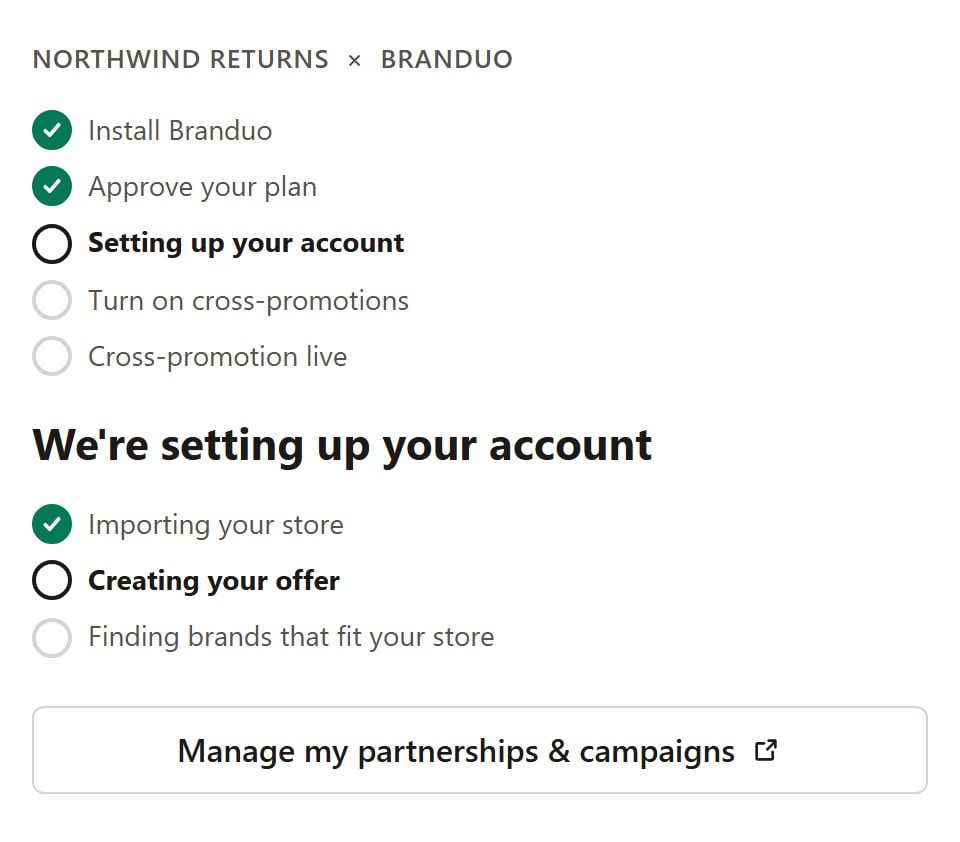
Branduo is importing the store, building the merchant's offer from their best sellers, and finding brands that fit. This usually takes a minute or two. The plugin checks progress on its own and moves on when setup finishes.
To bring merchants back to your app after they approve, see [Bring merchants back](/developer/embed/quickstart#4-bring-merchants-back-after-they-approve-their-plan).
## Setting up
Branduo is importing the store, building the merchant's offer from their best sellers, and finding brands that fit. This usually takes a minute or two. The plugin checks progress on its own and moves on when setup finishes.
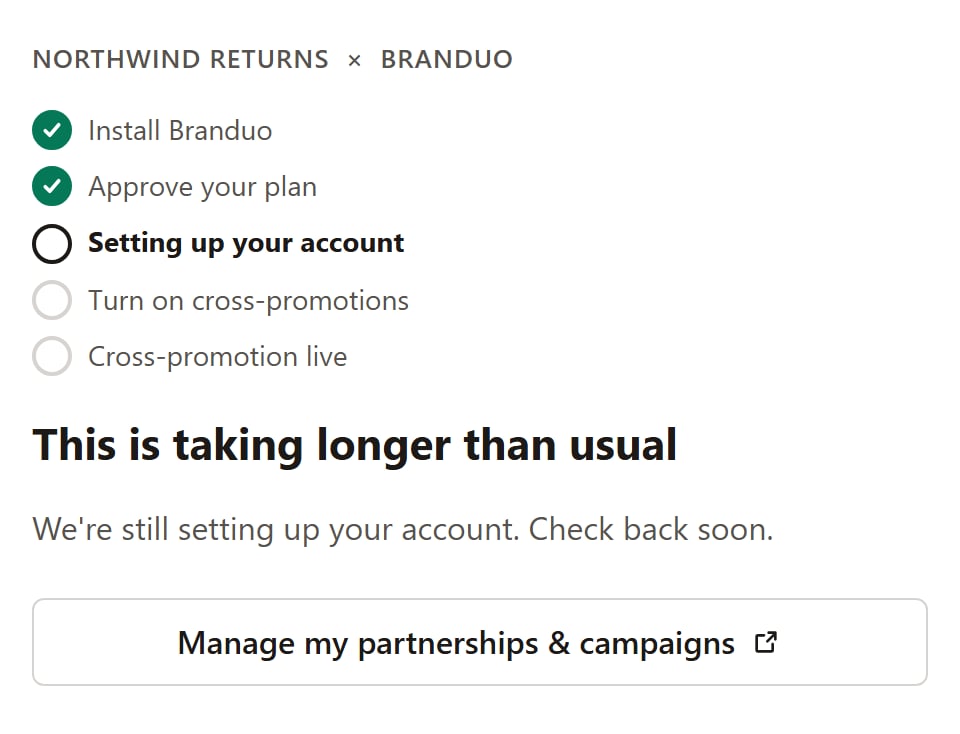
 If setup runs longer than usual, the stage becomes `delayed` and the plugin tells the merchant it's still working. Branduo keeps retrying in the background.
 ## Consent
Setup is done. The merchant sees a preview of their offer as shoppers at partner brands will see it: their logo, a tagline, up to three best sellers, and the discount. They choose the discount for new customers (10%, 15%, 20%, or 25%), then select **Turn on cross-promotions**. Doing so accepts the [Terms](https://branduo.io/terms) and [Privacy Policy](https://branduo.io/privacy).
## Consent
Setup is done. The merchant sees a preview of their offer as shoppers at partner brands will see it: their logo, a tagline, up to three best sellers, and the discount. They choose the discount for new customers (10%, 15%, 20%, or 25%), then select **Turn on cross-promotions**. Doing so accepts the [Terms](https://branduo.io/terms) and [Privacy Policy](https://branduo.io/privacy).
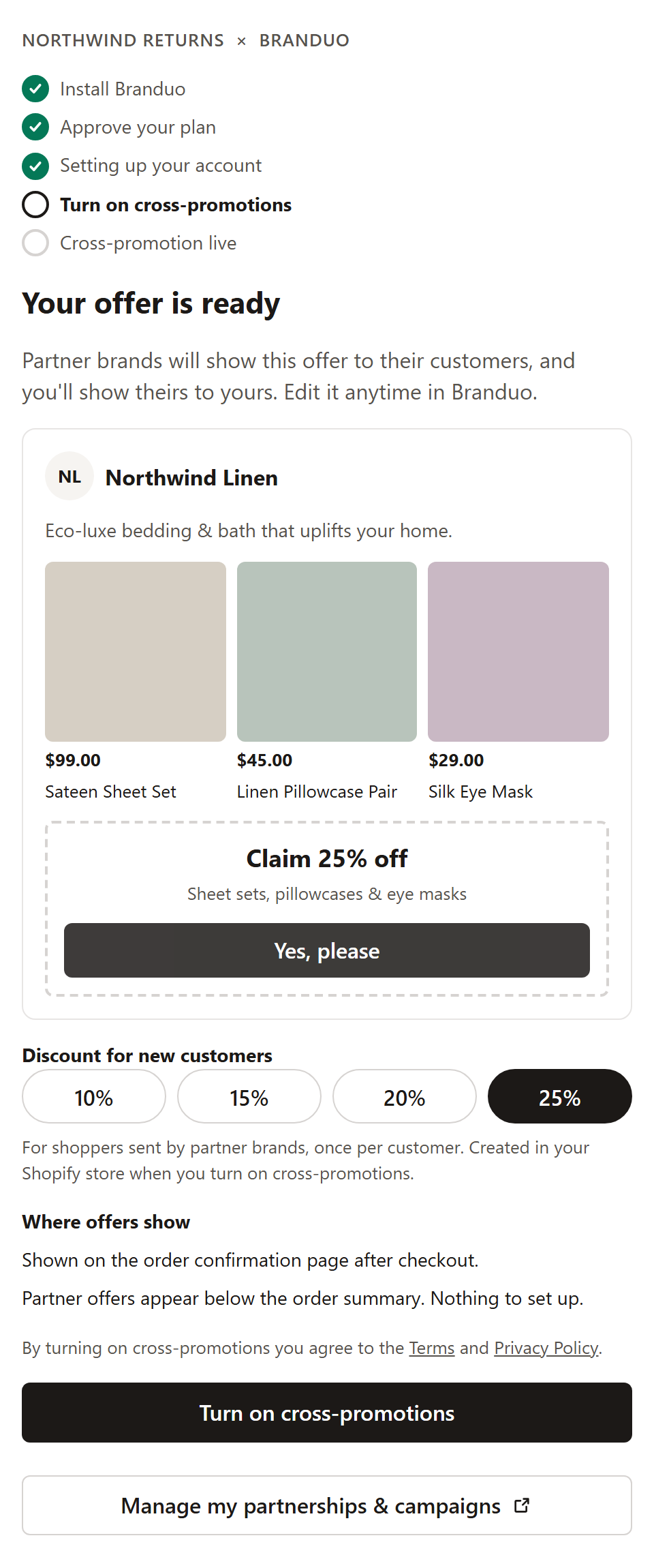 When they turn it on, Branduo creates one discount code in their Shopify store, usable once per customer, and starts showing their offer. If the store already has its Branduo discount, the plugin shows that percentage instead of the choices.
## Live
Cross-promotion is on. The merchant sees their live offer and a link to manage partnerships and campaigns in Branduo.
When they turn it on, Branduo creates one discount code in their Shopify store, usable once per customer, and starts showing their offer. If the store already has its Branduo discount, the plugin shows that percentage instead of the choices.
## Live
Cross-promotion is on. The merchant sees their live offer and a link to manage partnerships and campaigns in Branduo.
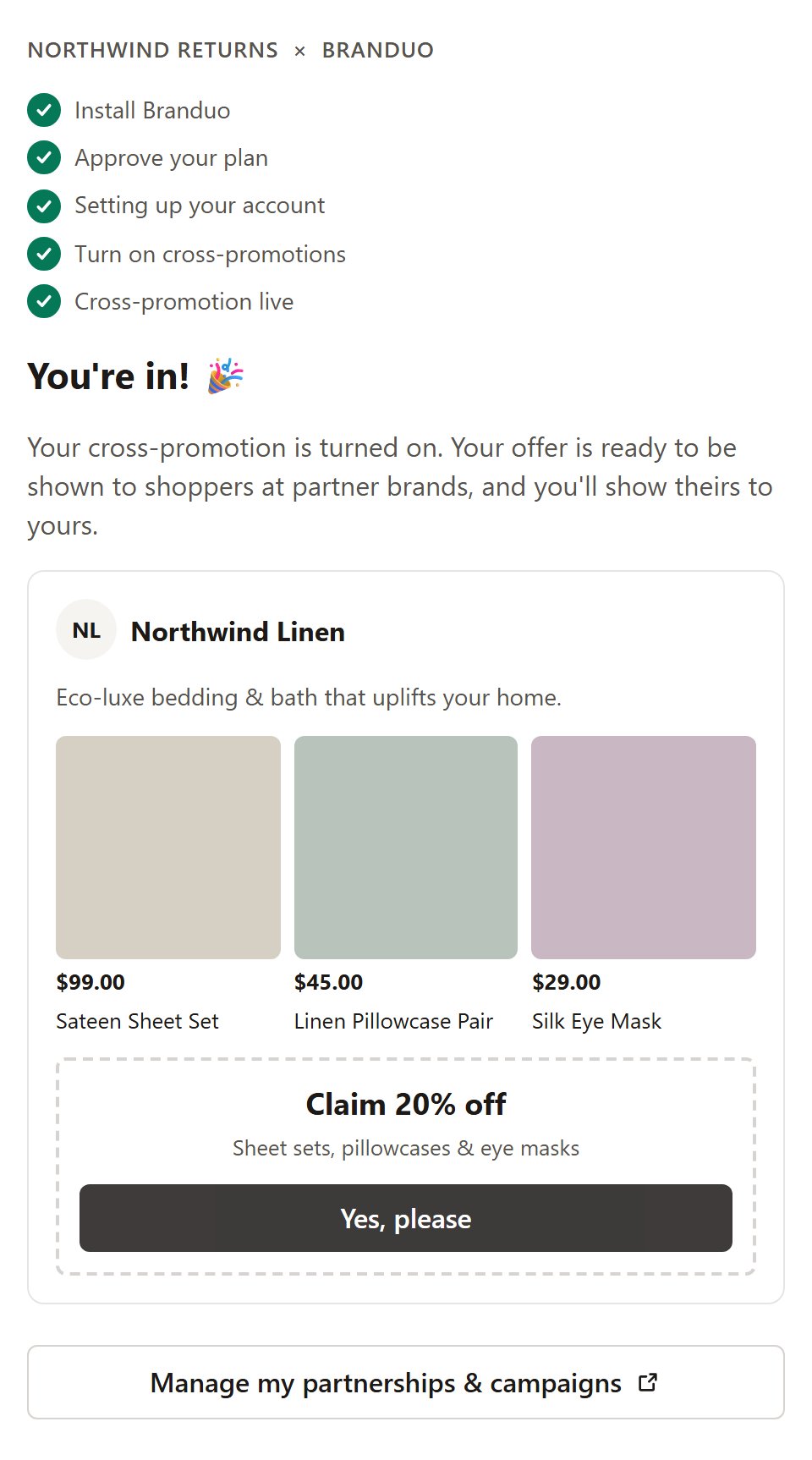 A merchant who turned on cross-promotions through another app is already `live` when they open yours. They never consent twice.
## Messages instead of a stage
Sometimes the plugin shows a message instead of a stage. In these cases, `onEvent` isn't called.
| Message | Why |
| - | - |
| Brand partnerships aren't available here yet | Your platform isn't set up to show cross-promotion offers yet. Contact Support. |
| Your store isn't eligible yet | The store doesn't meet Branduo's order minimum, or it has no active products with images. |
| Branduo isn't installed | The merchant uninstalled the Branduo app. Reinstalling it turns cross-promotions back on. |
| Your cross-promotion is turned off | The merchant closed their campaign in Branduo. They can turn it back on there. |
| We couldn't reach Branduo | A network or service error. The merchant can try again. |
See [Troubleshooting](/developer/embed/troubleshooting) for setup problems on your side.
This documentation is built and hosted on [Mintlify](https://mintlify.com), a developer documentation platform.
A merchant who turned on cross-promotions through another app is already `live` when they open yours. They never consent twice.
## Messages instead of a stage
Sometimes the plugin shows a message instead of a stage. In these cases, `onEvent` isn't called.
| Message | Why |
| - | - |
| Brand partnerships aren't available here yet | Your platform isn't set up to show cross-promotion offers yet. Contact Support. |
| Your store isn't eligible yet | The store doesn't meet Branduo's order minimum, or it has no active products with images. |
| Branduo isn't installed | The merchant uninstalled the Branduo app. Reinstalling it turns cross-promotions back on. |
| Your cross-promotion is turned off | The merchant closed their campaign in Branduo. They can turn it back on there. |
| We couldn't reach Branduo | A network or service error. The merchant can try again. |
See [Troubleshooting](/developer/embed/troubleshooting) for setup problems on your side.
This documentation is built and hosted on [Mintlify](https://mintlify.com), a developer documentation platform.